Postman CLI
API engineering for your coding agents
The Postman CLI works with Claude Code, Codex, Cursor and other coding agents. It gives them your organization's API context, plus the tools to test, mock, simulate and load test every change.
postman init puts your API files in git, installs agent skills in the repo and links a Postman workspace, so the next session picks up where the last one stopped.
Trusted by teams at


Install the Postman plugin in your coding agent
Install the Postman plugin and your agent gets Postman's skills: it checks what depends on an API before changing it, builds against mocks and simulations, tests and load tests the change, and records the results in Postman.
The plugin equips your agent in every repo it opens. postman init equips the repo, so every teammate, agent and CI job that opens it gets the same skills. Teams use both.
Marketplace
get the Postman plugin
claude plugin marketplace add anthropics/claude-plugins-officialclaude plugin install postman@claude-plugins-officialapi-discovery
Reuse the APIs your organization already has, and see what depends on one before you change it
api-testing
A repeatable test for every change, so regressions surface in review
api-mocking
Build against agreed behavior before the real API or its dependencies exist
performance-testing
Releases gated on latency and error-rate thresholds
api-monitoring
The same tests that passed in development, running against production
ci-integration
Merges that fail on a broken test, contract or governance rule


Try these prompts
CONTEXT GRAPH
Know what depends on an API before your agent changes it
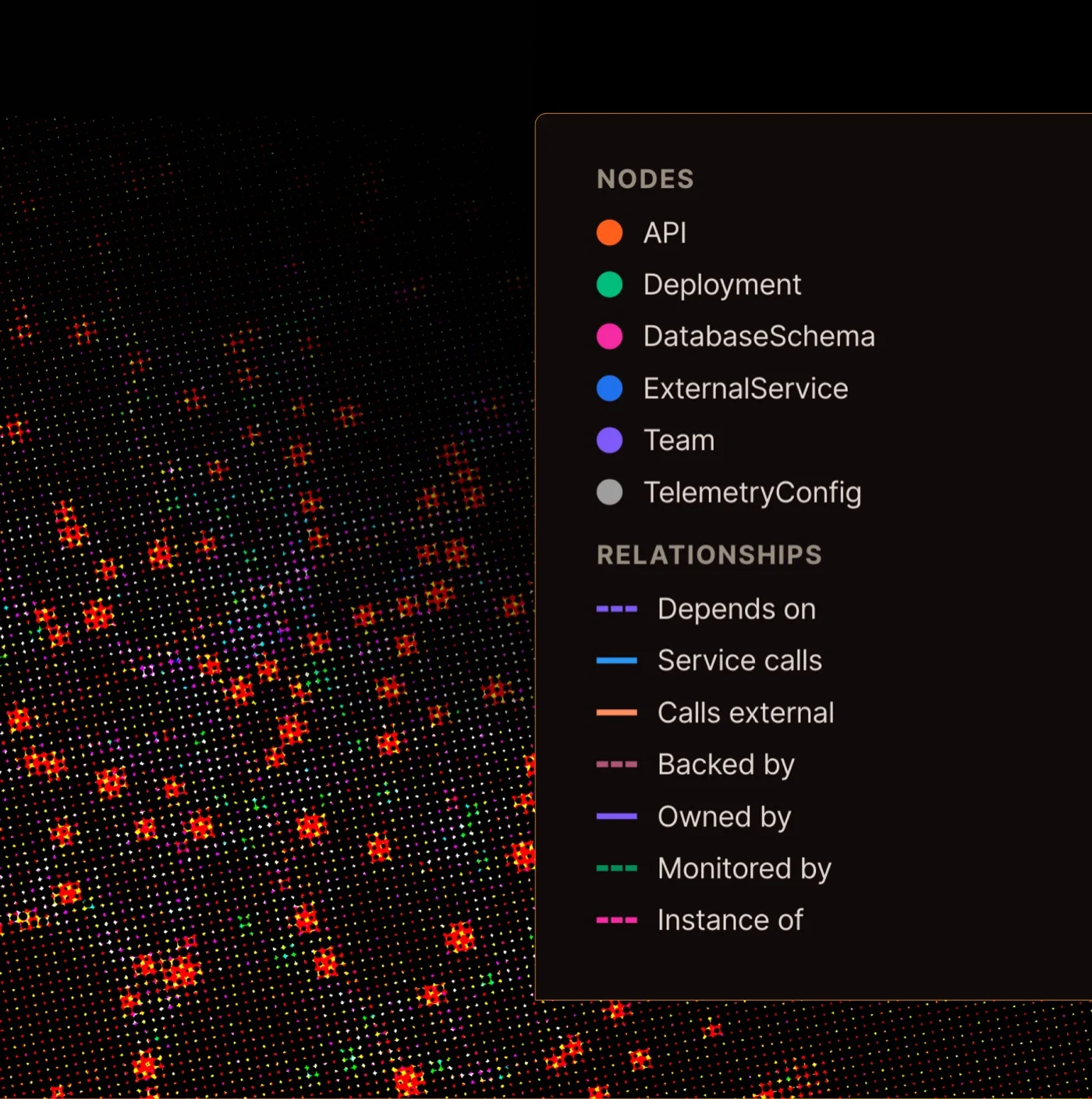
Your agent only sees the repo it's working in. Context Graph gives it a queryable map of everything else: your organization's APIs, deployments, database schemas, external services and teams. In Postman's benchmark, an agent found 129 services in its checkout and 498 with Context Graph.
Ask your agent "I'm changing the refunds API. What depends on it?" and it runs:
postman context-graph ask "What depends on the refunds API?" --waitOn Opus 4.7, querying Context Graph first cut prompt tokens by 29% on questions that span systems. Read the benchmark report (PDF)
WHY POSTMAN
Checks from outside your agent's own reasoning
An agent that writes both the code and the tests checks the work against its own assumptions. The Postman CLI gives it the spec, real runs, simulated dependencies and your organization's context to check against instead.
Your organization's API context
Context Graph, workspace context and published dependencies tell your agent who consumes an API, what the last session changed and which contract other teams published.
Dependencies you don't own, simulated
Stateful mocks and simulations stand in for the services your agent can't call. Scenarios add delays, errors, rate limits and random failures, so the agent tries the 429 before it ships the retry logic.
Checked against the contract
Spec lint, request tests and collection runs check the change against the contract, not just the tests the agent wrote for itself. Signed-in runs upload to Postman, and the CLI prints a link your team can review.
Performance testing
The same collection becomes a load test. Set load profiles and pass criteria like p95 under 300 ms, run locally or on Postman's cloud runners, and fail the build when a change makes the API slower.
The same checks in CI
The Postman CLI runs the same collections, tests and load tests in CI that your agent runs locally. Non-zero exit codes fail the build, whether a person or an agent wrote the change.
Secrets your agent never sees
Secret values go into a one-time browser form and are stored in your team's Shared Vault. The CLI never prints them, and coding agents only ever see secret names.
The next agent starts where this one stopped
Workspace pushes record what changed and which agent made it. A new session reads that history before it starts.


Frequently asked questions
The Postman CLI is Postman's API engineering toolkit for coding agents, terminals and CI. It gives Claude Code, Codex, Cursor and other agents your organization's API context, plus the tools to test, mock, simulate and load test every change. It is Postman's official, signed command-line tool, and it's bundled with the Postman desktop app.
Through Postman's agent skills: the Postman plugin equips your agent, postman init equips the repo, and teams use both. The plugin makes the skills available in every repo your agent opens: in Claude Code, run claude plugin marketplace add anthropics/claude-plugins-official and then claude plugin install postman@claude-plugins-official; in Codex, run codex plugin marketplace add postmanlabs/postman-plugin and then codex plugin add postman@postman; in Cursor, type /add-plugin postman. postman init writes the same skills into the repo under postman/skills/, with a pointer in AGENTS.md, so every teammate and CI job that opens it gets them. Run postman skills status to keep a repo's skills current.
Through four commands. postman context-graph ask answers questions about how your services depend on each other, postman workspace context shows what a linked workspace holds and what changed in it, postman dependency add and postman dependency install pull in collections and specs that other teams published, and postman describe returns the details an agent needs to write code against an API. Context Graph queries need a signed-in CLI and Context Graph enabled for your team. Context Graph is built from Git-connected Postman workspaces plus sources your team connects in Postman under Home > Agent Context, such as GitHub and New Relic.
Yes. postman performance run load tests a collection with --peak-vu virtual users for a --duration in minutes, using the fixed, ramp-up, spike or peak load profile. --pass-if sets thresholds on avg, p90, p95, p99, error_rate or rps, and a failed --pass-if exits 1, which fails the CI job. Add --runner postman-cloud to generate the load from Postman's cloud runners.
Yes. The Postman CLI runs the same collections, tests and load tests in CI that your agent runs locally, and returns non-zero exit codes that can block a release when tests fail. Authenticate with POSTMAN_API_KEY, and use --json or --output ndjson for machine-readable output and the built-in CLI, JSON, JUnit and HTML reporters for collection runs. On GitHub, the Postman CLI GitHub Action runs collection runs, monitors, syntax checks and governance validation in your workflows.
Not for local work. postman init and commands on local files need no account. Commands that reach Postman Cloud, including Context Graph, search and dependencies, need a sign-in or an API key, and signing in also uploads run results to Postman.
No. Secret values go into a one-time browser form and are stored in your team's Shared Vault. The CLI never prints them, and coding agents only ever see secret names.
The Postman CLI is Postman's official command-line tool. Newman only runs collections and only supports the v2.1 JSON collection format, so it can't run v3 collections from Postman v12 and later. The Postman CLI supports all collection formats, including the v3 YAML format required for Native Git, and also works with monitors, mock servers, and flows. To switch, convert v2.1 collections with postman collection migrate and follow the Newman to Postman CLI migration guide.
Availability of some Postman CLI commands depends on your Postman plan. Compare what each plan includes on the Postman pricing page.
Trusted by over 50 million developers and 500,000 companies.




Install for your agents